PokéBonk Patch Notes: v0.7.3 Changes & Affected Guides
Read sourced PokéBonk update summaries through v0.7.3, with links to affected controls, save, upgrade and Lab guides and clear verification limits.
Which version and source does this record cover?
The original English public version button showed Beta v0.7.3 when rechecked on 2026-10-19 (Beijing time). Its current-version notes are dated October 19, 2026; the source does not specify a timezone.
We distinguish reported changes from our own checks. A release note can describe a fix without proving recovery of a particular save, a performance gain on your phone or compatibility with every browser.
We read the v0.6.3 version and release panel on October 18, 2026. We did not interrupt a run, verify a restored result or test enforcement. Recovery of earned results is different from resuming a run at its exact interrupted moment.
Historical screenshot below: v0.6.2 was current when that image was captured on October 18. The later v0.6.3 note above comes from our subsequent reading of the live version panel; the older image has not been relabeled as a v0.6.3 capture.
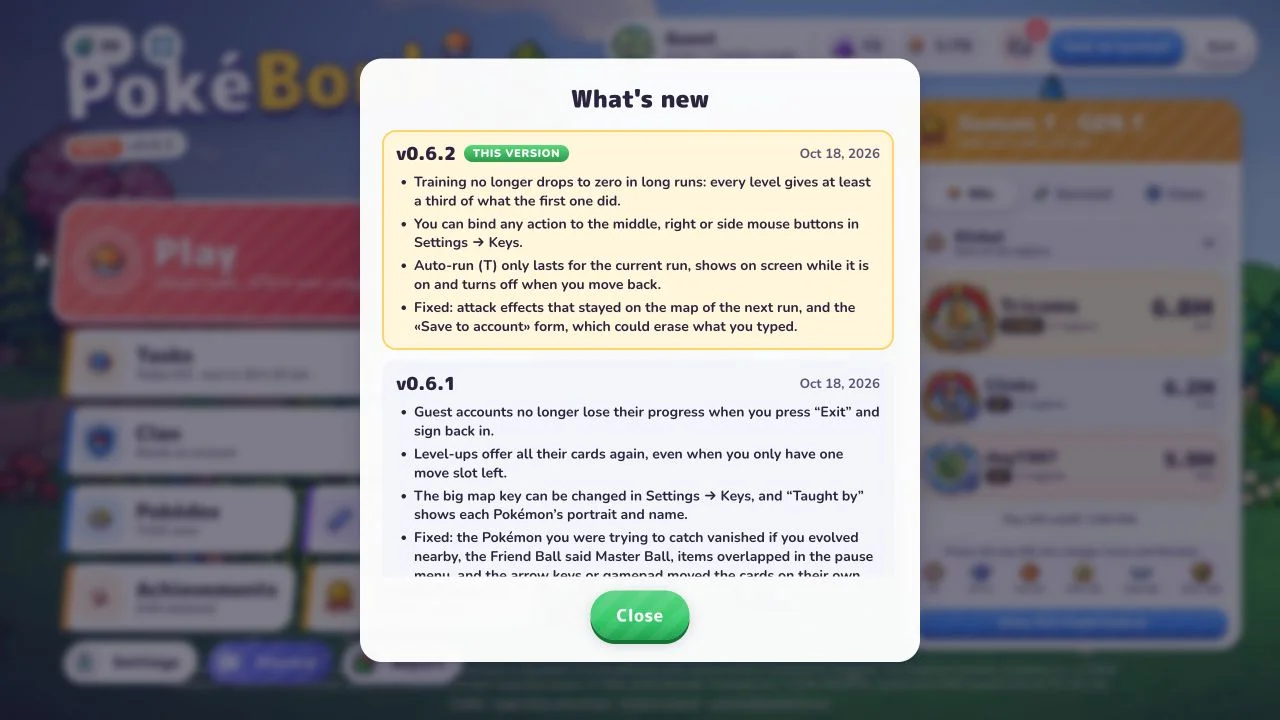
v0.7.3 — October 19: server capacity and Pokémon leaderboard loading
Official release notes:
- The official notes report increased server capacity to accommodate incoming players.
- The official notes report faster loading of the per-Pokémon leaderboard list.
Our check — 2026-10-19: In the original English game, Beta v0.7.3, we opened Leaderboard → Per Pokémon. The Pokédex list populated with public data; selecting Charmander changed the detail heading to Charmander. This confirms access and navigation in one desktop browser session. It does not measure a speed improvement. Unlike the earlier dated v0.7.2 maintenance check, this check reached the menu and list; it is not a general uptime guarantee.
The project gives no capacity figure, concurrent-player limit or loading-time comparison. We have no pre-update baseline and performed no controlled timing, load or FPS test. Server capacity, list loading and in-run rendering are different measurements. Physical iPhone/iOS Safari testing remains deferred.
Affected guides: Browser troubleshooting · Classic and Survival · Getting started
v0.7.2 — October 18: leaderboard cleanup and anti-cheating
Official release notes:
- The official notes report 47 accounts suspended for cheating and their leaderboard records removed.
- The official notes list cleared Time attack positions: #1 in Viridian Forest (Normal and Nightmare) and Rocky Desert (Nightmare), #2 in Viridian Forest (Nightmare) and Rocky Desert (Normal), and #3 in Rocky Desert (Hard). They also list #17 in Viridian Forest Normal KOs.
- The official notes report dozens of cleared Pokémon leaderboard positions, including Mankey #1 and Abra #2, as an explanation for players moving up.
- The official notes report additional leaderboard anti-cheating protection without specifying how it works.
These are dated reports of removed positions, not a live list of available ranks or a promise that your rank changed. Leaderboard removal, result review and save loss are different issues. The notes do not establish a new scoring formula or restored progress.
Our check — 2026-10-19: The original English public version button and What’s new panel showed Beta v0.7.2. At the time of this check, the game displayed a server-maintenance notice and did not offer the leaderboard menu. We verified the version and release text only: we could not independently check suspensions, removed records, individual ranks or protection effectiveness. We did not sign in, create a Guest or start a run.
Affected guides: Browser and result troubleshooting · Classic and Survival · Getting started
v0.6.4 — October 18: review, interface and Safari audio
Official release notes:
- The original project reports fewer legitimate runs incorrectly sent for review, particularly on poor connections. This does not guarantee that every missing result has been restored.
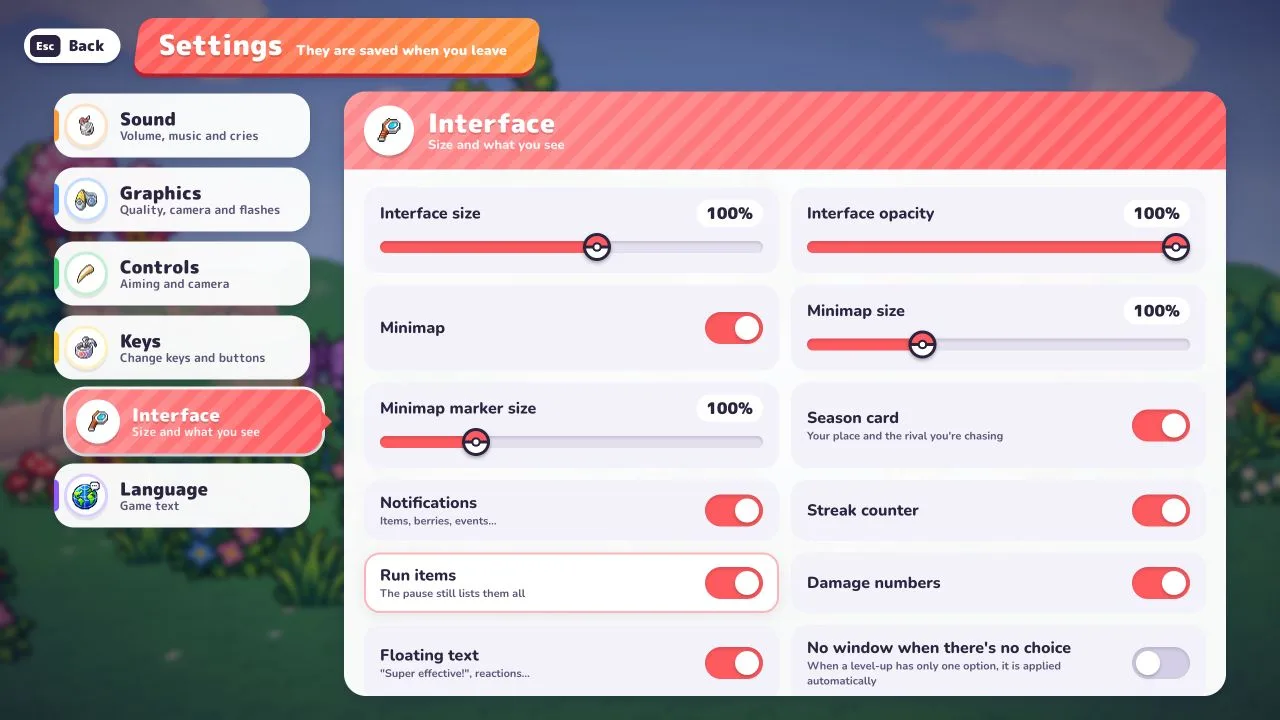
- Settings → Interface can hide corner run items; the original project also reports that long builds no longer cover the minimap. This is a display change, not a change to item effects or caps.
- The original project reports automatic sound recovery in Safari when returning to the game from another window. The note does not specify macOS versus iOS or embedded versus standalone play.
Our checks — 2026-10-19: In the original English game, Beta v0.6.4, we opened Settings → Interface and found Run items, with the help text “The pause still lists them all”. We switched it off, left Settings, reloaded, and confirmed it remained off; then restored the original on setting. This desktop browser check verifies the switch and its persistence only. We did not create a long build to test minimap overlap, reproduce weak-network review, or verify Safari audio recovery. Physical iPhone/iOS Safari testing remains deferred.
Affected guides: Browser troubleshooting · Getting started · Controls and aiming · Run upgrades · Items and vitamins
v0.6.3 — October 18: recovered results and validation
The official history reports that recovered run results were incorrectly rejected after the game closed. It says that error is fixed and affected results have been saved. It also reports stricter validation of edited currency and zones cleared without dealing damage.
We read the v0.6.3 version and release panel on October 18, 2026. We did not interrupt a run, verify a restored result or test enforcement. Recovery of earned results is different from resuming a run at its exact interrupted moment.
Affected guides: browser and save checks, getting started and controls.
v0.6.2 — October 18: Training, mouse bindings and auto-run
The original notes report a lower bound for long-run Training rewards: later levels should give at least one third of the first level’s reward. They also describe binding actions to middle, right and side mouse buttons; limiting auto-run to the current run, with an indicator and backward movement cancelling it; and fixes for effects carrying into the next run and text disappearing from Save to account.
Our check: Settings → Keys contains mouse-button remapping instructions and T for Auto-run. We inspected these menus, not long-run rewards or the fixed form. The permanent Training purchase in the Lab is a separate system.
Affected guides: Controls and aiming, run upgrades and permanent Lab progression.
v0.6.1 — October 18: Guest progress and upgrade choices
The notes report a Guest-progress fix around Exit and signing back in, plus restored full card offers when one move slot remains. They also describe editable big-map bindings, clearer move-learning identities and fixes involving capture targets, item labels, overlapping items and unintended card navigation.
Our check: M appears as Big map in Keys. We did not deliberately reproduce Guest loss, a missing-card case or capture/evolution interactions. A fourth move slot and a fourth offer choice remain distinct Lab upgrades.
Affected guides: Browser and save troubleshooting, upgrade cards and the Lab.
v0.6.0 — October 17: explored maps and a mobile fix
The notes restrict both the big map and minimap to explored information, removing an earlier reveal of the guardian altar, portal and remaining zone contents. They also report a mobile home-screen flicker fix with Battery saver enabled.
This later map correction takes precedence over v0.5.7’s earlier reveal description. We did not verify either a full-map reveal or that mobile fix on physical hardware.
Affected guides: Classic and Survival and browser troubleshooting. Do not turn an older map screenshot into a current route guarantee.
v0.5.6–v0.5.8 — October 17: results, loading and settings
The history reports these selected changes:
- v0.5.8: species-play progress counts beyond the last 30 runs.
- v0.5.7: earned run results are recorded after returning from a closed/reloaded browser or lost connection; loading waits for assets, and repeat downloads after updates are reduced. The notes add a big map, move-learning and run-build views, configurable inputs, aiming-related options and mobile changes. Its map-reveal claim was subsequently corrected in v0.6.0.
- v0.5.6: Hide my attacks was added to Graphics, alongside changes to run review and enforcement.
Our check: the v0.6.2 menus contain Hide my attacks, separate own-attack opacity, Camera distance and Battery saver. Battery saver’s description caps rendering at 30 FPS and lowers resolution. These are menu observations, not a speed benchmark. Recording earned results does not establish resuming the exact interrupted moment or restoring every previously lost result.
Affected guides: Current graphics and save checks, controls and getting started.
v0.5.3 — October 17: stacking and item limits
The history says same-kind bonuses add rather than repeatedly multiply, and item maxima are enforced: Ditto should not copy full items and Meowth should not sell them. These are reported balance rules, not our test of every combination or vitamin cap.
Check a build’s version, mode and permanent upgrades before trying to reproduce an old high-damage clip. This wiki does not infer an optimal current build from those notes.
Affected guides: Moves and vitamins and Lab item-pool states.
How should you use this history with a guide?
- Check the version below the original game’s logo and open its version history.
- Compare the version and tested scope on the guide. Older run examples retain their original dates; a new menu check does not revalidate every old result.
- Follow the affected-guide link for the menu or decision you need. Prefer a later correction when two version entries differ.
- For a missing result, preserve your original browser session and record version, time, mode and the observed outcome before reporting it to the game operator.
Sources and verification
Primary source: Charcher’s original English game, version button → What’s new, read on October 18, 2026 with v0.6.2 marked current. Screenshot captured by us. Keys, Controls, Graphics and all 19 level-zero Lab upgrade cards were separately inspected that day. No long-run Training comparison, crash/recovery experiment, every-item stacking test or physical-phone fix verification is claimed. We omit future features and release dates not established by this source.
Related Articles
Guides
PokéBonk Move Learning: Starter Kits, Levels & Free Slots
Find all three starter move panels, compare signature and evolution-line levels, and understand shared League kits, random offers and free-slot requirements.
Guides
PokéBonk Video Guides: Beginner Chapters & Gameplay
Find two sourced PokéBonk video references with authors, languages, durations and beginner chapter links. Compare older footage with current written guides.
Guides
PokéBonk Items & Vitamins: Effects, Caps and Tradeoffs
Compare 12 checked PokéBonk items, rarity, effects and caps. Distinguish vitamins, move upgrades and permanent Lab growth before choosing a bonus.
Was this helpful?
Thanks for the feedback!