PokéBonk Classic vs Survival: Modes and Difficulty
Compare PokéBonk Classic and Survival menu descriptions, zones, guardians, milestones and difficulty options before you start a run.
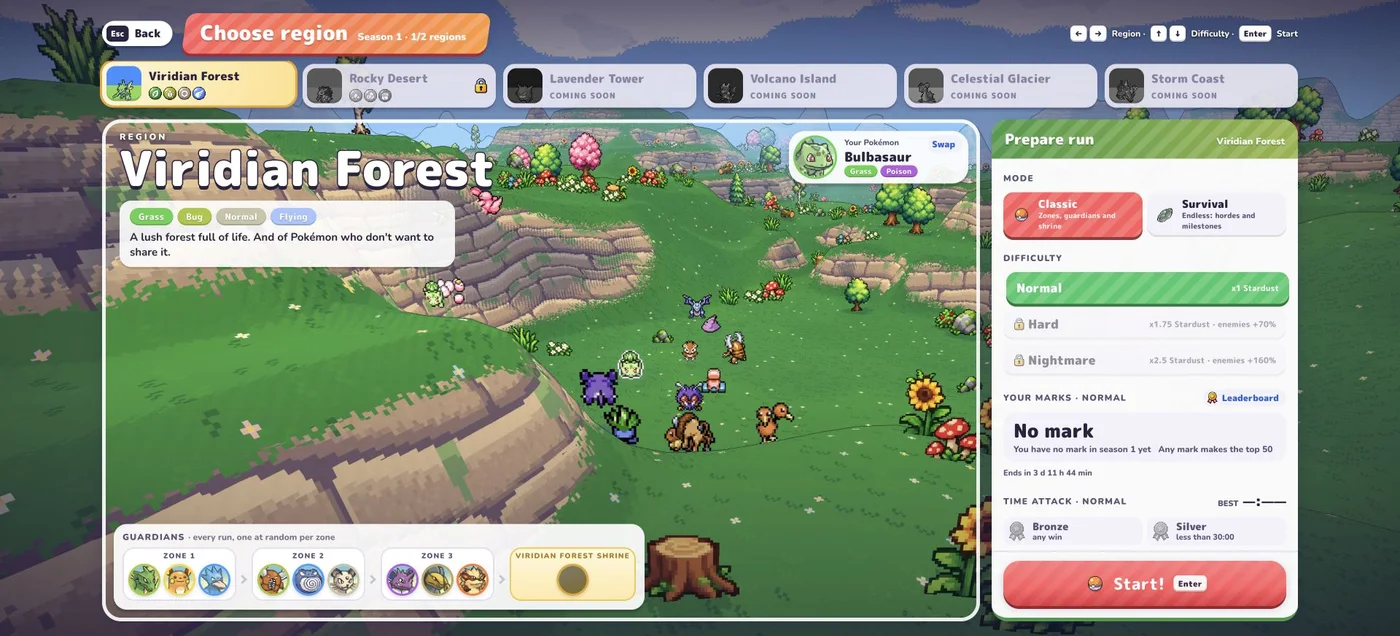
How does the preparation screen describe each mode?
| Mode | Current menu description | What our check establishes |
|---|---|---|
| Classic | Zones, guardians and shrine | Direct menu inspection and an early run showing Zone 1/3. |
| Survival | Endless: hordes and milestones | Direct menu inspection; no long-session benchmark. |
The main menu has Play for Classic and a separate Survival button. After selecting a League member, the region preparation screen also offers both modes. If instructions you found only show an older entry flow, follow the labels on your current screen.
What does an early Classic run show?
Our Viridian Forest run showed Zone 1/3, Normal difficulty and a countdown alongside a separate elapsed run time. The preparation screen previews potential guardians for each zone and a region shrine.
Those previews explain the mode’s structure; they do not establish which guardian you will fight on every attempt. We have not completed all zones in this verification session and do not publish a shrine or boss-clear strategy from it.
When should you try Survival?
Try it when you want to explore the endless structure described by the game. Treat milestones and the timer you see during that run as the current source of truth. Do not assume a Classic countdown or zone objective applies unchanged.
For an understandable comparison, use the same partner, region and difficulty. A result with another partner on another map cannot isolate the effect of mode choice. This guide does not claim that one mode is better for rewards or unlocks.
Is difficulty the same thing as mode?
No. The checked preparation screen separately lists Normal, Hard and Nightmare. Mode describes the run structure; difficulty is another setting. The interface shows reward/enemy modifiers, but we have not tested those modifiers across runs and do not convert them into an efficiency recommendation.
Start with Normal while learning desktop movement and aiming. Review your partner’s kit before increasing the number of things you change.
Where do you go next?
Use getting started for the exact preparation sequence. Once a run begins, use the upgrades guide to read offers against the moves and vitamins you already have. These pages all cover the original game at pokebonk.com, not Touchzada’s separate project.
Sources and verification
Checked October 17, 2026 against the original English game, Beta v0.5.5, on desktop. Direct checks covered the Settings/Controls screen, Bulbasaur’s League profile, Viridian Forest preparation and an early Classic run with pause inspection. No complete clear, evolution chain, multiplayer or mobile gameplay test is claimed. Secondary references are identified inline.
Related Articles
guides
PokéBonk Not Loading? Browser and WebGL Troubleshooting
Troubleshoot PokéBonk connection errors, a missing 3D scene, lag and aiming problems with a symptom checklist that protects your Guest session.
guides
PokéBonk Controls: Keyboard, Camera and Aiming
Find PokéBonk’s desktop keys for movement, jump, slide, Ultimate and pause. Compare Automatic and Manual aiming with checked setup steps.
guides
How to Play PokéBonk: Beginner Guide
Start the original PokéBonk in your browser: enter as a Guest, choose a starter, select Classic or Survival and prepare your first Normal run.
Was this helpful?
Thanks for the feedback!